Verlux CRM

Keep the CRM that works.Deploy Verlux CRM when needed.

If your current CRM can support the lead operation, Verlux keeps it and connects what is missing. If not, Verlux CRM becomes the lead operations core inside the wider Lead-to-Revenue System.

Part of the Lead-to-Revenue System, not a standalone CRM offer.

Verlux CRM

Lead operations view
Product visual
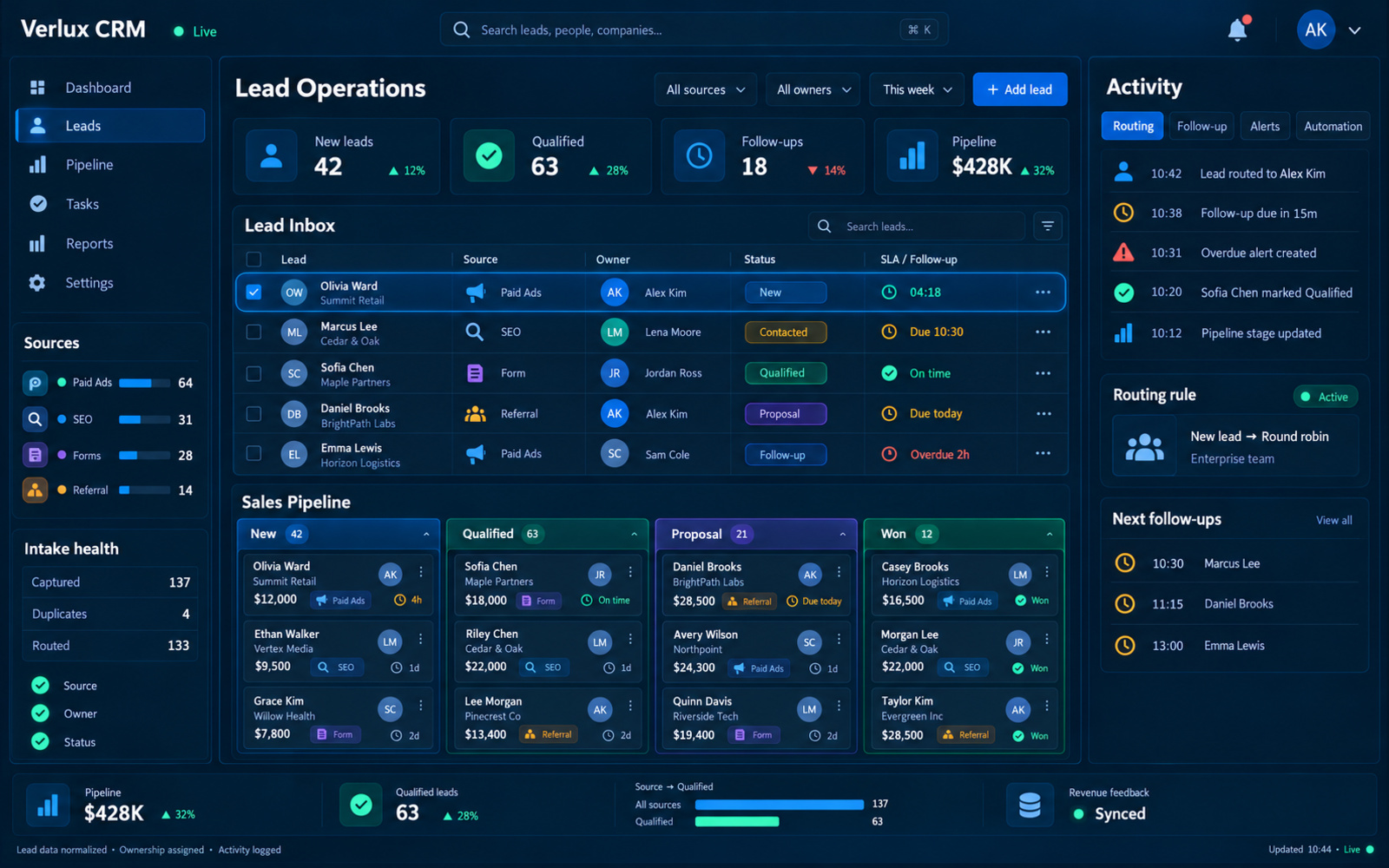
Verlux CRM lead operations visual showing lead sources, pipeline stages, ownership, follow-up activity and connected revenue feedback.
Lead intake, ownership, follow-up, pipeline and revenue feedback shown in one connected operating view.

Two CRM paths

Different starting points.One connected lead operation.

Diagnose first. Keep the current CRM when it can support the operation. Deploy Verlux CRM only when a suitable CRM layer is missing.

CRM path decision

Keep what works · deploy only what is missing
Diagnose first
Starting questionCan the current CRM support the lead operation?
  • Lead intake
  • Ownership
  • Follow-up
  • Pipeline
  • Reporting

Yes · current CRM works

Keep it.

Verlux does not force a migration simply to move the client onto a preferred tool. The existing CRM remains in place when it can support the required lead-to-revenue operation.

  1. 01Audit the current data structure, tracking and pipeline
  2. 02Review integrations and reporting
  3. 03Build connectors and automation around the existing CRM
  4. 04Improve attribution and lead operations without unnecessary migration
OutcomeImprove the wider system without unnecessary migration.

No · suitable CRM layer is missing

Deploy Verlux CRM.

Verlux CRM provides the operating foundation for lead intake, ownership, follow-up, pipeline and downstream reporting when the client does not already have a suitable CRM.

  1. 01Configure the workspace around the client's business rules
  2. 02Connect lead sources and acquisition context
  3. 03Define pipeline, status, ownership and follow-up rules
  4. 04Connect the CRM with automation, reporting and external systems
OutcomeAdd the CRM foundation required by the wider system.
Same destinationA connected Lead-to-Revenue System
  • Acquisition context
  • Clear ownership
  • Follow-up
  • Pipeline
  • Revenue feedback

What Verlux CRM operates

The lead record stays connectedfrom capture to revenue.

One operating record carries acquisition context into sales work, then connects downstream outcomes back to the source that created it.

Connected lead record

Context moves with the lead
Active
  1. 01

    Operating stage

    Capture

    Bring demand in without losing acquisition context.

    • Lead intake
    • Lead record
    • Acquisition context
    • Data quality
  2. 02

    Operating stage

    Operate

    Move each lead through ownership, follow-up and pipeline.

    • Pipeline & qualification
    • Ownership & routing
    • Follow-up operations
    • Activity & audit history
  3. 03

    Operating stage

    Measure

    Connect downstream outcomes back to acquisition.

    • Downstream outcomes
    • Funnel & performance reporting
    • Integration & data access
    • Workspace & access
Context railWhat should remain attached to the same lead
  • Source
  • Campaign
  • Owner
  • Next follow-up
  • Pipeline stage
  • Revenue outcome

Data & system ownership

Your data stays yours.The core stays maintainable.

Verlux separates reusable technology from client-specific configuration and client-owned business data.

Verlux CRM architecture

Core → configuration → client data
Clear ownership
  1. 01

    Verlux-owned

    Reusable CRM Core

    • Lead model
    • Pipeline logic
    • Routing patterns
    • Connectors
    • Reporting modules
  2. 02

    Client-specific

    Configured Workspace

    • Fields
    • Pipeline
    • Ownership rules
    • Access
  3. 03

    Client-owned

    Business & Customer Data

    • Leads
    • Activity
    • Pipeline data
    • Revenue outcomes
    • Acquisition context
Verlux ownsReusable technology
Configured forClient operating rules
Client ownsBusiness & customer data

Architecture safeguards

Maintainable without artificial lock-in.

  • Role-based access
  • Logs, backup & recovery
  • Exportable client data
  • Replaceable dependencies

Clear focus

Solve the lead problem.Keep specialist tools specialized.

Verlux CRM stays focused on the operating work between acquisition and revenue. Everything else can connect without being rebuilt inside the CRM.

Core job

What belongs inside Verlux CRM

Keep inside
  1. 01Lead intake
  2. 02Ownership & routing
  3. 03Follow-up operations
  4. 04Pipeline & qualification
  5. 05Funnel & performance reporting
Fewer lost leads. Clearer pipeline. Revenue feedback.

Specialist tools

What does not need to become CRM functionality

Connect instead

Communication stack

  • Call center / telephony
  • All-in-one inbox
  • Mass email platform

Builders & marketplaces

  • Website builder
  • DIY automation builder
  • Integration marketplace

Back office & bespoke

  • ERP / accounting
  • Dedicated mobile app
  • Unlimited custom software

Need something more?

Connect first. Extend carefully.

  1. 01

    Connect

    Keep the specialist tool

    If another platform already does the job well, connect the required data instead of rebuilding it.
  2. 02

    Extend

    Add reusable capability

    If the requirement belongs inside lead operations, assess a reusable module before custom work.
  3. 03

    Phase

    Build complexity in stages

    Larger requirements should be phased instead of turning one CRM project into an endless software build.

Find the right CRM path

You may not need a new CRM.You need the right lead operation.

Start with a System Audit so Verlux can understand how leads currently enter the business, where follow-up breaks down, what tools you already use and whether your existing CRM should stay or Verlux CRM should become the operating core.

Start a System Audit

Less manual work. Fewer lost leads. Clearer revenue data.

What the audit starts withContext before recommendation
  1. 01
    Funnel

    How leads enter and move through the business.

  2. 02
    Stack

    Tracking, CRM, spreadsheets and automation already in place.

  3. 03
    Bottlenecks

    Where ownership, visibility or manual work starts to break.